
Goldmine in ChatGPT Live · Limited preview
Ask for better-fit Upwork jobs. Pursue them with confidence.
Ask by voice or chat: “Any good Upwork picks for me today?” Goldmine connects your ChatGPT conversation to Upwork in Chrome, checks visible job and client signals, and helps prepare a proposal grounded in the experience you share.
You approve the draft. Goldmine prefills supported fields. You submit.
US$9/month · 7-day trial · No card required to try
Filtering and the Pursuit Board work on their own. Voice and chat through the optional ChatGPT plugin require preview access; the plugin is not yet publicly listed. You review and submit every proposal yourself.

Illustrative scene based on a real ChatGPT Live session; example jobs and screen details may differ.
Ask out loud
“Any good Upwork picks for me today?”
Plan my day
“How's my Upwork day looking? What should I focus on first?”
Prepare my proposal
“Draft a proposal for my best match using the experience I've shared.”
The ChatGPT workflow · Limited preview
From a promising job to a proposal that sounds like you.
Find the jobs worth a closer look
Review Best Matches, Most Recent or Saved Jobs, or search by keyword and review up to 50 results. Goldmine checks visible client and job signals to help you shortlist.
Check the brief against your experience
Ask ChatGPT to inspect selected job descriptions and compare the requirements with the experience you share. Decide what to pursue, clarify or pass on.
Prepare a proposal you can stand behind
Draft and refine a proposal grounded in the job and your experience. After you approve the text and supported terms, Goldmine can prefill supported Upwork fields. Review everything and submit yourself.
Ask ChatGPT by voice or text to find opportunities, compare a selected brief with the experience you share, and prepare a proposal that sounds like you. Goldmine carries out supported browser steps through the Chrome extension. Keep the Upwork tab in front when the workflow asks.
Read the extension guide to get started. AI recommendations need your judgment. Goldmine never submits proposals or spends Connects.
One line. Stronger client and activity signals.
A decision aid, not another dashboard.
Spend your time and Connects on opportunities worth pursuing. Goldmine weighs visible client-history and job-activity signals, then compresses them into one recommendation and the strongest reason behind it. You can decide whether a job deserves your attention without reading another scorecard.
When you want more context, the complete job is already open. Your experience, fit and proposal judgment remain in charge.
- GOLD STAR / GOLDMINE PICK
- Stronger client-history and job-activity signals. Review your fit before proposing.
- MANUAL-LOOK PICK
- One concern needs a quick human decision.
- RECOMMEND REJECT
- Protect your Upwork Connects and attention. After reviewing your picks, you can still revisit this and other jobs if time permits.
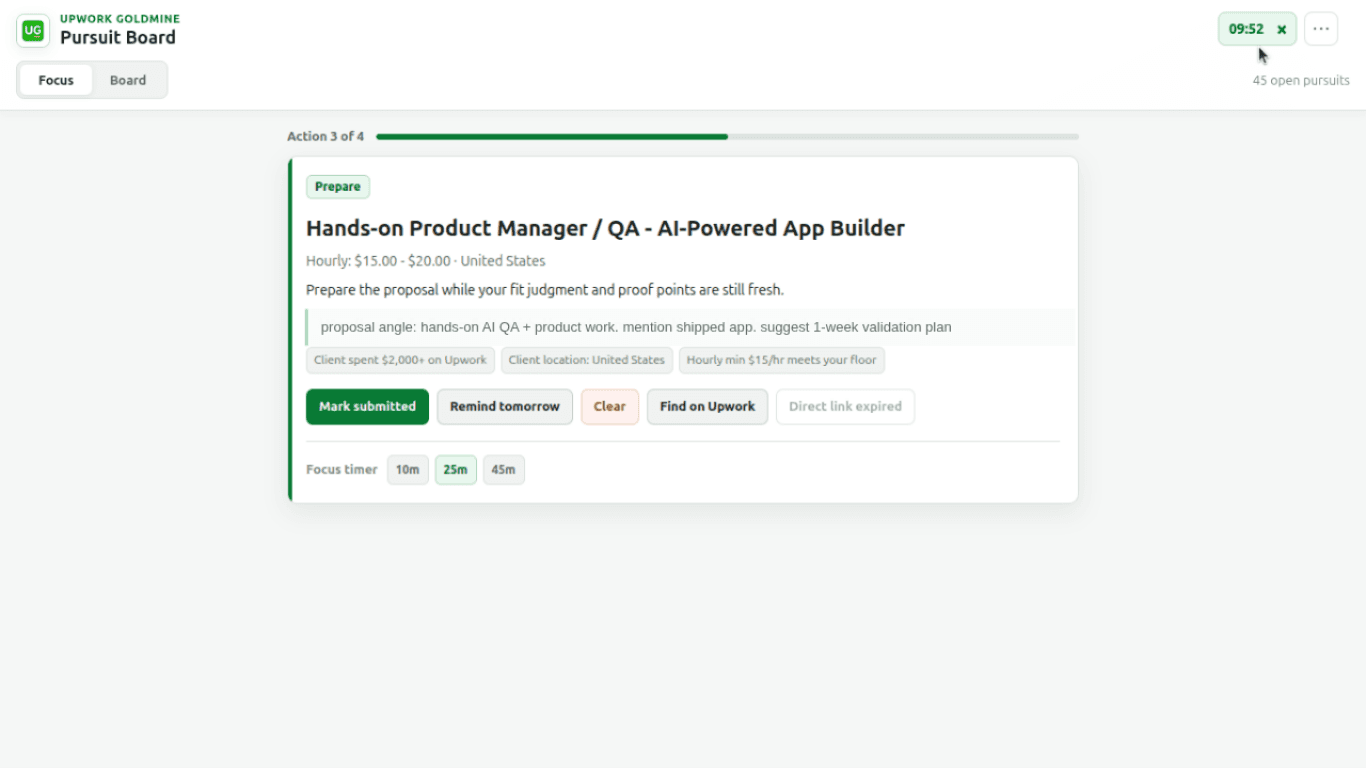
Pursuit Board
A job worth pursuing should not disappear into another tab.
Decide what deserves effort, keep the proposal angle beside the job, work through focused reminders, mark submissions and responses, clear stale opportunities, and return through a reliable title search when an old direct link expires.
Explore the Pursuit Board workflowProduct facts
Useful without pretending to be magic.
- Your Upwork password stays yours
- Goldmine never asks for it and never submits a proposal or spends Connects for you.
- You remain the decision-maker
- Goldmine gives you a recommendation and the decisive reason; your experience and fit still decide the proposal.
- Your pursuit stays portable
- Your board remains visible and exportable as CSV even when paid access is inactive.
- Built from the same frustration
- Goldmine began as a way to make one freelancer's own Upwork practice more focused and consistent.
Built from direct freelancer experience
Make the next proposal a deliberate business decision.
Muthukkumaran K. built Goldmine after three years of trying to make his own Upwork practice focused and consistent. More than 300 organic free-beta installs, without paid promotion, confirmed that other freelancers recognized the same problem.
7 days of full access. No card required.